
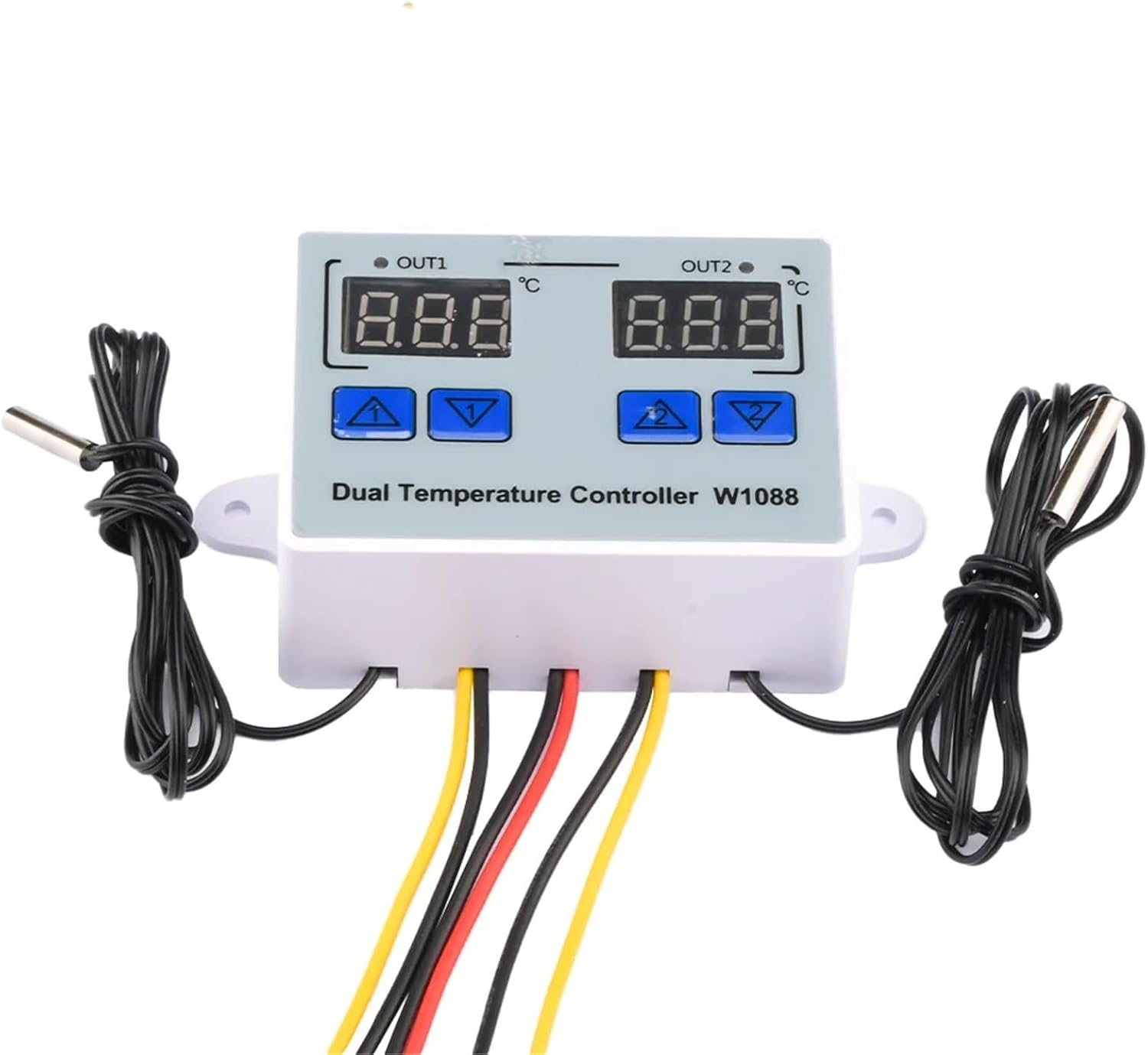
W1088 Computer Dual LED Digital Temperature Sensor Meter Controller Electric Heating Thermostat 12V Thermoregulator(12V)
Product details
| Management number | 231368284 | Release Date | 2026/06/18 | List Price | US$40.62 | Model Number | 231368284 | ||
|---|---|---|---|---|---|---|---|---|---|
| Category | |||||||||
Temperature ControllersW1088 Computer Dual LED Digital Temperature Sensor Meter Controller Electric Heating Thermostat 12V Thermoregulator Product selling points:1: Widely used, incubator heating and cooling, home temperature control, farms, various cold storages, greenhouses, aquariums, etc2: Dual digital thermostat3: Three voltage specifications to choose from4: Exquisite appearance5: Easy to useParameters:Temperature sensor: NTC 10K B value 3435Temperature measurement range: -50 ° C~120 ° CResolution: 0.1 ° CAccuracy: ± 1 ° CSensor length: 1mOutput type: Direct output 10AVoltage specification: 12V 24V AC110-20VSize: 7.5 * 5.5 * 3cmHeating mode setting method<;Stop temperature (the program automatically determines that the working mode is heating mode)Setting method:1. Long press and hold the up button to activate the temperature flashing. Use the up and down buttons to set the activation temperature value2. Long press the down button to stop the temperature flashing, and set the stop temperature value through the up and down buttonsUse case:Control the water heater, stop heating when it reaches 65 ° C, and restart heating when the temperature drops to 50 ° C. How to set it?Step 1: Confirm that the working mode is heating mode, and the starting temperature is less than the stopping temperatureStep 2: Press and hold the up button to activate the temperature flashing. Use the up and down buttons to set the activation temperature to 50 ° CStep 3: Long press the down button to stop the temperature flashing. Use the up and down buttons to set the stop temperature to 65 ° C, and the setting is completeCooling mode setting methodSetting essentials: Start temperature>Stop temperature (the program automatically determines that the working mode is cooling mode)Setting method:1. Long press and hold the up button to activate the temperature flashing. Use the up and down buttons to set the activation temperature value2. Long press the down button to stop the temperature flashing, and set the stop temperature value through the up and down buttonsUse case:How to control the farm, stop ventilation at 26 ° C, and restart cooling when the temperature rises to 28 ° C?Step 1: Determine the working mode as cooling mode, with the starting temperature>stopping temperatureStep 2: Press and hold the up button to activate the temperature flashing. Use the up and down buttons to set the activation temperature to 28 ° CStep 3: Long press the down button to stop the temperature flashing. Use the up and down buttons to set the stop temperature to 26 ° C, and the setting is complete!Detailed list:1 * Digital display intelligent temperature dual controller (12/24/AC110-20V voltage specifications optional)==========Battery Included : NoHign-concerned Chemical : NoneIs Smart Device : NoOrigin : Mainland Use : HouseholdCertification : Display Size : 1.9 Inches & Under
- Temperature Controllers
- W1088 Computer Dual LED Digital Temperature Sensor Meter Controller Electric Heating Thermostat 12V Thermoregulator
| ASIN | B0GFCK7KPK |
|---|---|
| Color | 12V |
| Brand Name | JZXUPTUVI |
| Part Number | JZXUPTUVI |
| Manufacturer | JZXUPTUVI |


Bestseller ranking
Weld Nuts




Customers who viewed this product also viewed
Pilates


Correction of product information
If you notice any omissions or errors in the product information on this page, please use the correction request form below.
Correction Request Form